

From VMware to Hyper‑V: A Practical Migration Guide for IT Managers

John Koziaris
Chief Executive Officer

For many IT managers, VMware renewals have become a reason to reassess the virtualisation roadmap. With VMware licensing and pricing changes now part of the discussion, more organisations are looking at whether Microsoft Hyper-V is a practical alternative for their environment.

The good news is that moving from VMware to Hyper-V does not need to be a high-risk, big-bang project. When planned properly, it can be completed in a controlled, repeatable way — one virtual machine at a time, with clear validation and rollback options at every step.
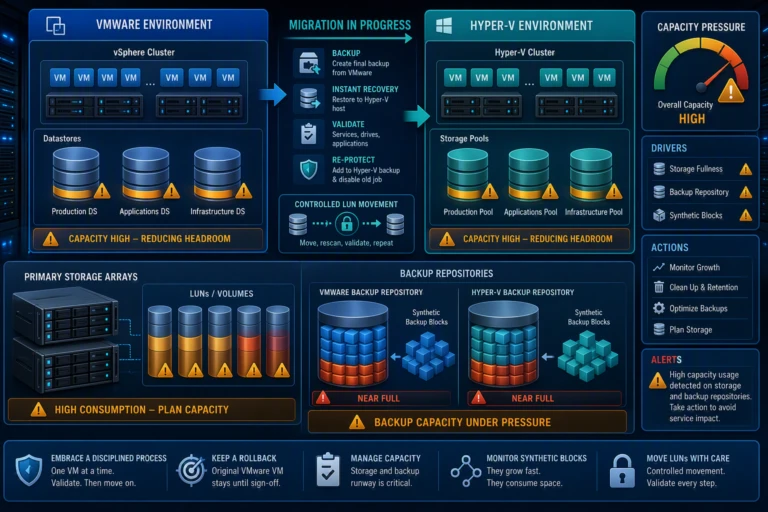
Practical Migration Guide for IT Managers

Why Hyper-V Is Worth Considering

Hyper-V is a strong option for organisations already invested in Microsoft technologies. It is built into Windows Server, works well with Active Directory environments, supports mainstream Windows and Linux workloads, and includes clustering and live migration capabilities without requiring a separate hypervisor licence.


For many mid-market businesses, that makes Hyper-V a practical and cost-effective platform for production workloads. However, it is important to check whether the organisation relies on VMware-specific features such as NSX, vSAN, DRS affinity, or third-party appliances that are only available as VMware images. 

Before committing to a migration, IT teams should review workloads, licensing, backup compatibility, storage, networking, and application dependencies.

The Recommended Migration Method

The most reliable approach is not a risky live conversion. It is a backup-and-restore process using a trusted backup platform such as Veeam Instant Recovery.


The logic is simple: if the organisation already trusts its backup platform to restore virtual machines, that same process can be used to restore VMware workloads onto Hyper-V hosts. 

This approach has three important advantages:

  • The original VMware VM remains untouched and available as a rollback option. 
  • The team uses a tool and process it already understands. 
  • The migrated VM can be protected as part of the new Hyper-V backup process immediately after cutover.

In simple terms, the migration becomes a controlled restore, validate, and protect process rather than a complex one-off conversion.

A Simple Per-VM Migration Runbook

A practical migration should be completed one VM at a time. This keeps the process manageable and makes each step easier to validate. 

A typical process looks like this:

  1. Baseline the VM before migration, including services and drive letters. 
  2. Shut down the VMware VM cleanly. 
  3. Run a final backup to capture the latest state. 
  4. Restore the VM to a Hyper-V host using Instant Recovery. 
  5. Remove VMware Tools after the restore. 
  6. Validate services, drive letters, event logs, and the application itself. 
  7. Add the new Hyper-V VM to the correct backup job and retire the old VMware protection. 


The key is to validate the application, not just whether the server boots or responds to ping.

Project Phases That Keep the Migration Controlled

A VMware-to-Hyper-V migration should be treated as a structured project, not a rushed technical task. The guide recommends a phased approach covering discovery, project management, setup, implementation, QA, documentation, and handover.

A simple project structure includes:
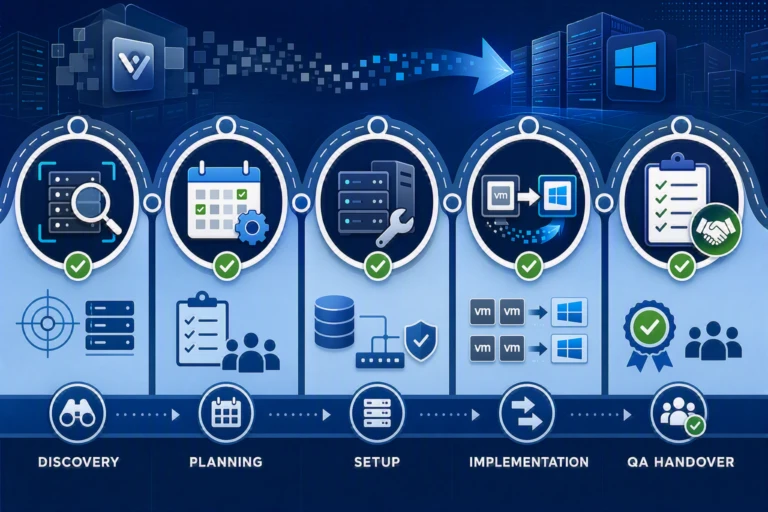
1. Discovery and Assessment

Confirm the VM inventory, application dependencies, datastore usage, snapshots, VMware Tools status, backup coverage, licensing, host compatibility, storage capacity, network mapping, and application owners.

2. Project Planning

Agree on the migration schedule, change windows, communications, responsibilities, and regular update cadence.

3. Setup

Build the Hyper-V hosts, configure storage, update backups, and complete a test migration before touching production workloads.

4. Implementation

Move VMs one at a time, validating each workload before moving to the next.

5. QA and Handover

Update documentation, CMDB records, monitoring, backup jobs, disaster recovery plans, and service desk notes.

The test migration is especially important because it exposes issues with drivers, licensing, and storage before production workloads are affected.

What Effort Should IT Managers Expect?

Enhancing Productivity with AI Tools
The guide notes that recent migration projects typically consumed around 100–200 engineer-hours end to end, including host rebuilds, VM migrations, storage work, backup and DR reconfiguration, validation, and documentation.

The actual conversion of an individual VM may only take minutes to hours, but the surrounding work — storage, networking, validation, backup, DR, and documentation — is where most of the effort sits.

This is why stakeholders should budget for the full project, not just the cutover windows.

Best Practices for a Smooth Migration

If there is one principle to follow, it is this: keep every move small, controlled, and reversible.

The key best practices are:

Test the migration process on low-risk VMs first.

Keep the original VMware VM until the Hyper-V copy is validated.

Capture a baseline before migration and verify it afterwards.

Validate the application layer, not only the operating system.

Migrate one VM at a time.

Add each migrated VM to a Hyper-V backup job immediately.

Update CMDB records, licensing information, monitoring, DR documentation, and service desk handover notes.

Frequently Asked Questions

Is Hyper-V a good replacement for VMware?

For most mid-market workloads, yes. Hyper-V is a credible and cost-effective platform for mainstream Windows and Linux server VMs, especially where the organisation already uses Windows Server and Microsoft infrastructure.

Can VMware workloads be migrated to Hyper-V without downtime?

The recommended approach requires a short maintenance window for each VM because the VM is shut down cleanly before the final backup and restore. The original VMware VM remains available as a rollback option until the Hyper-V copy is signed off.

What is the most reliable migration method?

The guide recommends backup-and-restore using Veeam Instant Recovery because it uses a trusted backup mechanism, keeps the move reversible, and avoids relying on unfamiliar one-off conversion tools.

Do VMware Tools need to be removed?

Yes. VMware Tools should be removed after migration because leftover tools can cause driver and service errors once the VM is running on Hyper-V.

What is the biggest risk?

Storage capacity is the biggest practical risk. During the transition, teams may be supporting VMware storage, Hyper-V storage, and backup repositories for both environments at the same time.

Bottom Line for the IT Managers

Hyper-V can be a strong destination for organisations looking to move away from VMware, particularly where Microsoft infrastructure is already in place. The safest migration path is controlled, phased, and reversible.
 
Run a test migration. Plan storage and backup capacity early. Validate the application, not just the operating system. Keep the source VM available until the new Hyper-V workload is approved. Then update backups, monitoring, CMDB records, and disaster recovery documentation before closing the project.

For IT managers reviewing their next VMware renewal, the best next step is a short scoping exercise: inventory the VMs, confirm dependencies, check CPU and licensing positions, and size the storage runway before committing to the migration.

Planning a move from VMware to Hyper-V?

alltasksIT helps mid-market organisations modernise infrastructure across VMware-to-Hyper-V migrations, cloud, backup, and disaster recovery. This guide draws on real migration projects, with client names and infrastructure details generalised.
Complete the form and our team will contact you to discuss your environment and help map the right migration strategy and approach.

Author

John Koziaris

CEO/Founder

Founder and Principal of alltasksIT with 30+ years IT experience, John has a broad and varied experience across cloud computing strategies.

John has been successfully realising IT and networking solutions for small to medium businesses for over 25 years.