

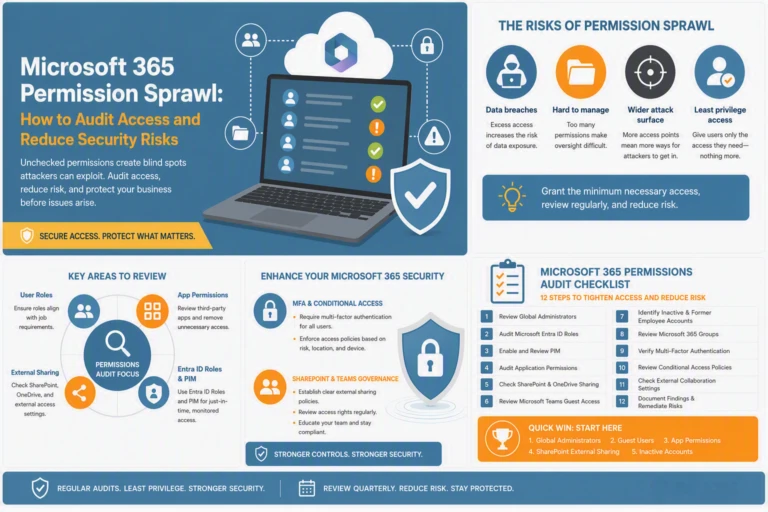
Permission sprawl in Microsoft 365 silently creeps into your environment, creating risks you might not spot until it’s too late. Every unchecked role, external share, or unchecked app consent widens your exposure and weakens your security posture. This Microsoft 365 permissions audit guide shows what to review now to tighten control, reduce risk, and protect your business before issues arise.
Unchecked permissions in Microsoft 365 can lead to significant security threats. When users have more access than necessary, it increases the risk of data breaches and other cyber threats.

Unchecked permissions can open the door to external threats. If users have access to sensitive information they don’t need, this can lead to accidental data leaks or intentional misuse. The more permissions there are, the harder it is to track and manage them effectively. This is why understanding and managing permissions is crucial for maintaining a secure environment.
A key strategy in managing permissions is implementing least privilege access. This means granting users only the access necessary to perform their job functions. By doing so, you minimise potential security risks. This approach reduces the attack surface and helps prevent the misuse of sensitive information. In practice, it involves regularly reviewing and adjusting permissions to ensure that they align with current user roles and responsibilities.
CEO/Founder
Founder and Principal of alltasksIT with 30+ years IT experience, John has a broad and varied experience across cloud computing strategies.
John has been successfully realising IT and networking solutions for small to medium businesses for over 25 years.